Duct 4.0.6 BETA 2 Release Notes
- Matt Long (Unlicensed)
The 4.0.6 Release included Improvements and Bug fixes. The purpose of this release is to continue the development and provide product replacement for Legacy Sheetmetal and Fabshop products.
Improvements
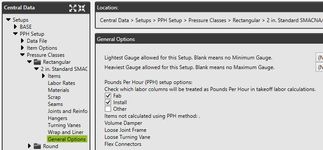
1. Pounds Per Hour Setup
- Pounds per hour (PPH) is a labor setup within QuoteSoft Duct.
- Added the ability to check which labor factors are PPH (Fab, Install, Other)
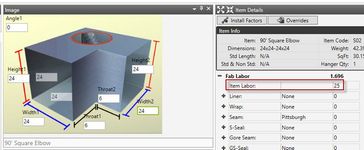
- Takeoff displays PPH Factor used
2. Overrides to Labor and Material Costs in Takeoff
User Guide article on Overrides
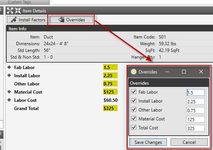
- Added a button to the Item Details palette in Takeoff
- This will allow users to override the Fab, Install, Other labor hours as well as the Material Cost and Grand Total
- The overridden fields will be highlighted yellow in Takeoff
3. Setup Catalog Items by Width + Height
User Guide article about W+H Catalog Items
- Added additional Group Setup options for W+H in the Catalog
- Takeoff will add the width and height to select the correct labor and material costs
4. Add Catalog Item from Takeoff
User Guide article for Catalog Item From Takeoff
- Added the ability to add a catalog item on the fly like Legacy Sheetmetal Miscellaneous ( ? ) item
- This feature is the same as the Legacy Sheetmetal Miscellaneous (?) item, we added the ability to create an item on the fly and add to your bid.
- Added the ability to right click the Catalog Group and choose New Item
- Users can input Name, Labor Factors, and Costs
- The item can then be accepted and it will be stored for future use
5. Add Static Reports
Added static reports for users to run on completed takeoffs. The reports added:
- List Report
- List By Zone Report
- Summary Report (one page summary)
- Zone Breakout Report
- Zone Total Report
6. Birdscreen End Cap
User Guide article on Birdscreen End Cap
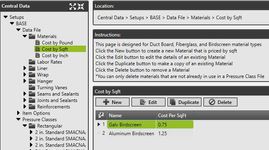
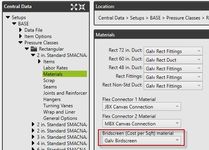
- Added a new material type to the program for the Birdscreen material called Cost by Sqft. You can find this in Central Data - Setups - Data File - Materials
- The Cost by Sqft Material is then assigned within the Pressure File on the Materials page near the Flex Connector material selector
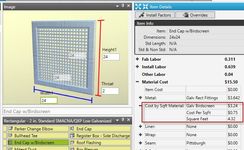
- Takeoff will show the Cost by Sqft material in Item Details
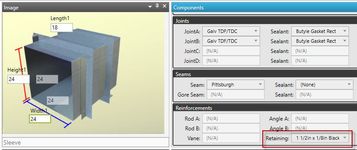
7. Rectangular Sleeve Fitting
User Guide article on Rectangular Sleeve
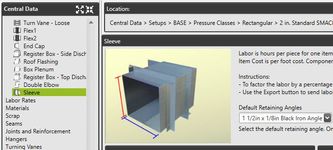
- Added the ability to select Retaining Angles for the Sleeve Fitting to the Item view within the pressure file
- Retaining Angles are pulled from Central Data - Setups - Data File - Reinforcements - Angles
- This choice was made so users are not required to have multiple angles setup within the program
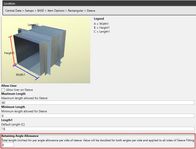
- Added an allowance field for Retaining Angles to the Sleeve Item setup in Item Options
- Added a Retaining Angle selector to Takeoff Item Details palette to display the Angles being used on the Sleeve Fitting
8. Additional Miscellaneous Improvements
- Do not allow 2 users in same zone
- Store the labor rate that was used with the item in audit trail
- Do not allow running a report on an open zone
- Refresh item details as soon as hanger drop or spacing is changed
- Do not allow the user to delete their last pressure class
- If a component is checked set as default within a pressure class automatically check as alternate
Bug Fixes and Corrections
- Corrected a misspelling in Central Options for Install Factors - Change "Slopped" to "Sloped"
- Takeoff is increasing hanger labor when drop increases too much
- Reducer and transition lengths getting reset when editing
- Cannot print if special characters in report name
- Lower component grids in data file not updating on import from excel unless you close and reopen Central Data
- Changing Joints during Auto Scale - Joints reset on items that follow
- Install factor text label corrected to show 25 feet for Duct Height instead of 15 feet twice
- Rectangular tap resets height on immediate second use of item
- Rectangular Joint Fab Labor when using Coil Line Options is not deducting Joint Fab time correctly
- Radius rectangular fittings are not using radius liner scrap
- No joint length displayed for round joint sealants
- Joint sealant selection is not checking for item type
- We are not showing catalog labor rates ($/hr value) in item details
- Non-standard annotations storing incorrect color
- Show circumference length for round hangers in item details
- Not saving hanger spacing or drop unless you tab out of the box
- Setting Vane to None does not clear out all cost data
- Round rectangular tap (register tap) sqft calculations need to be verified
- Takeoff using 4in diameter data for 3in diameter for all round items
- Takeoff resets defaults (joints, seams, etc) on size change forcing users to do size change first
- Spiral Pipe price per Lineal foot is incorrect in Takeoff
- Unable to edit accepted assembly items
©2022 ConstructConnect, Inc. All rights reserved.