Pounds Per Hour (PPH) Labor Setup
Before enabling PPH it is advised that you read through this entire article. Pounds per hour is a labor setup within QuoteSoft Duct. This type of labor setup divides the total weight of an item by a factor to get the labor hours. The labor factors can be setup for Fabrication, Installation, and Other.
Determining what PPH Factors Include
Typical PPH setup will have an adjusted Data File setup due to some components not requiring a labor factor as it is part of the PPH factor applied to the item. An example of a Rectangular 90 Degree Elbow with components of:
- 1.5in Liner
- Turning Vanes
- Pittsburgh Seams
- TDC Joints
- Butyle Gasket Sealer
- 18ga Hanger Straps
The list of components above would have a labor breakdown for PPH like below
- Liner is a component that is applied using a square foot per hour factor. Not included in PPH
- Turning Vanes do not have a weight associated with them in a typical setup, so they will not increase the Lbs when used. Not included in PPH
- Seams increase the amount of metal (pounds) required for manufacturing the item. Included in PPH
- Joints, in the case of TDC will increase the amount of metal (pounds) required for manufacturing the item. Included in PPH
- Joint Sealer will not increase the pounds of the item. Not included in PPH
- Hanger Straps will not increase the pounds of the item. Not included in PPH
With this example of a Rectangular Elbow we would need to change component labor on the Seams and Joints to zero (0) so we do not double up on our Fabrication and Installation PPH factors. Those adjustments would be made in Central Data - Setups - Data File on their respective component pages.
PPH Setup Within QuoteSoft Duct
After making changes in the Central Data - Setups - Data File component pages the pressure file will need modified as well.
Configure the Pressure File to be PPH
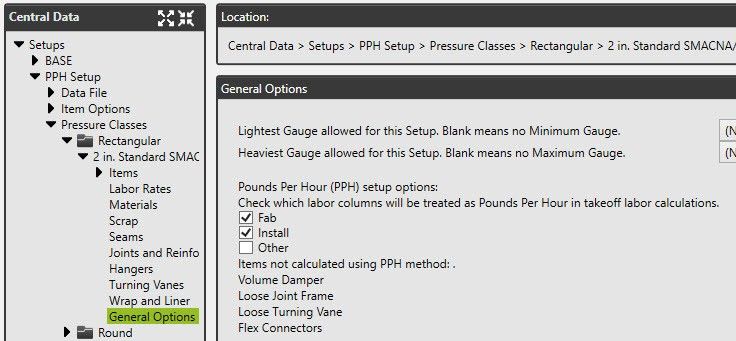
- Click the Central Data Button to access the setup screens
- Expand in the navigation tree Setups - Pressure Classes - expand the pressure class desired to be setup as PPH
- Click on General Options section
- Check the labor factors you wish to be treated as PPH (Fab, Install, Other)
- Be aware which items are not calculated using PPH: Volume Dampers, Loose Joint Frames, Loose Turning Vanes, Flex Connectors
Global Change Pressure File for PPH Factors
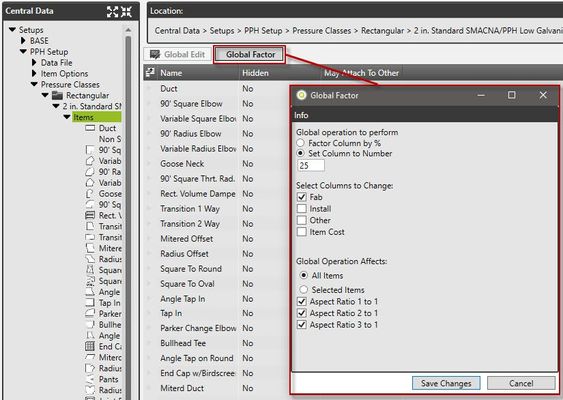
- Within the Pressure File click on the Items node in the navigation tree to access the list of items
- Click Global Factor at the top of the item list
- Select the second option to Set Column to Number
- Input the desired PPH Factor
- Select the columns to change
- Click Save Changes and the change will be applied
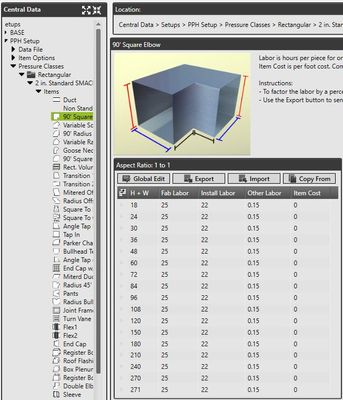
- Repeat the steps to make the changes to other labor factors (Fab, Install, Other)
©2022 ConstructConnect, Inc. All rights reserved.